SL- Processes
Key processes trigerred by Sales team are as given below:
- Student adminssion: New student
- Student Transfer
- Other Sales
Key activites that need to be performed in the given sequence are as given below:
Student admission
New student applicant process variant- Process flow:
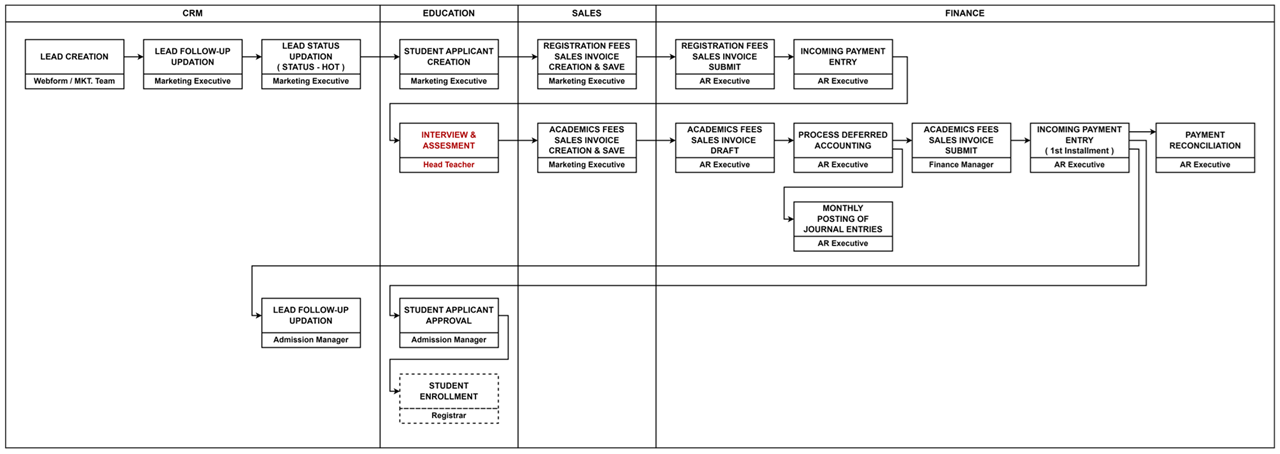
| Activity | Executed by | Navigation | Link |
|---|---|---|---|
| Lead Creation | Marketing Executive | Home > CRM > Sales Pipeline > Lead in ERPNext OR Lead creation through SIS Website | [Click here] |
| Lead Follow-Up Updation | Marketing Executive | Home > CRM >Sales Pipeline > Lead > Follow up tab | [Click here] |
| Lead Status Updation | Marketing Executive Admission Manager | Home > CRM > Lead > Lead List | [Click here] |
| Student Applicant Creation | Marketing Executive | Navigation: Home > CRM> Lead> Create> Student Applicant | Click here |
| Registration Fee Sales Invoice Creation | Marketing Executive | Navigation: Home > Education> Student Applicant> Create Sales Invoice OR Navigation: Home > Selling > Sales Invoice | Click here |
| Sales Invoice Submission | AR Executive Finance Manager | Home > Accounting Module > Select Sales Invoice > Click on New Sales Invoice OR Home > Go to Selling Module > Go to Sales Invoice | [Click here] |
| Incoming Bank Entry | AR Executive | Home > Accounting Module > Select Payment Entry > Click on New Payment Entry OR Home > Go to Accounting Module > Select Receivables > Go to Payment Entry > Click on New Payment Entry | [Click here] |
| Academic Fees Sales Invoice Creation | Marketing Executive | Navigation: Home > Education> Student Applicant> Create Sales Invoice OR Navigation: Home > Selling > Sales Invoice | Click here |
| Academic Fees Sales Invoice Creation | AR Executive | Navigation: Home > Education > Fee Schedule list > Select Create Sales Invoice | Click here |
| Process Deferred Accounting | AR Executive | Home > Accounting Module > Process Deferred Accounting | [Click here] |
| Monthly Posting of Journal Entry | AR Executive | Home > Accounting Module > Journal Entry | [Click here] |
| Sales Invoice Submission | AR Executive Finance Manager | Home > Accounting Module > Select Sales Invoice > Click on New Sales Invoice OR Home > Go to Selling Module > Go to Sales Invoice | [Click here] |
| Incoming Bank Entry | AR Executive | Home > Accounting Module > Select Payment Entry > Click on New Payment Entry OR Home > Go to Accounting Module > Select Receivables > Go to Payment Entry > Click on New Payment Entry | [Click here] |
| Payment Reconciliation | AP Executive / Finance Manager | Home > Go to Accounting Module > Select Payables > Go to Payment Reconciliation | [Click here] |
| Lead Follow-Up Updation | Marketing Executive | Home > CRM >Sales Pipeline > Lead > Follow up tab | [Click here] |
| Student Applicant Approval | Admission Manager | Home>Education>Student Applicant>click on Approve / Reject (button) | Click here |
| Student Enrollment for the Academic Year | Registrar | Home>Education>Student Applicant>click on Enroll button | Click here |
Student Transfer
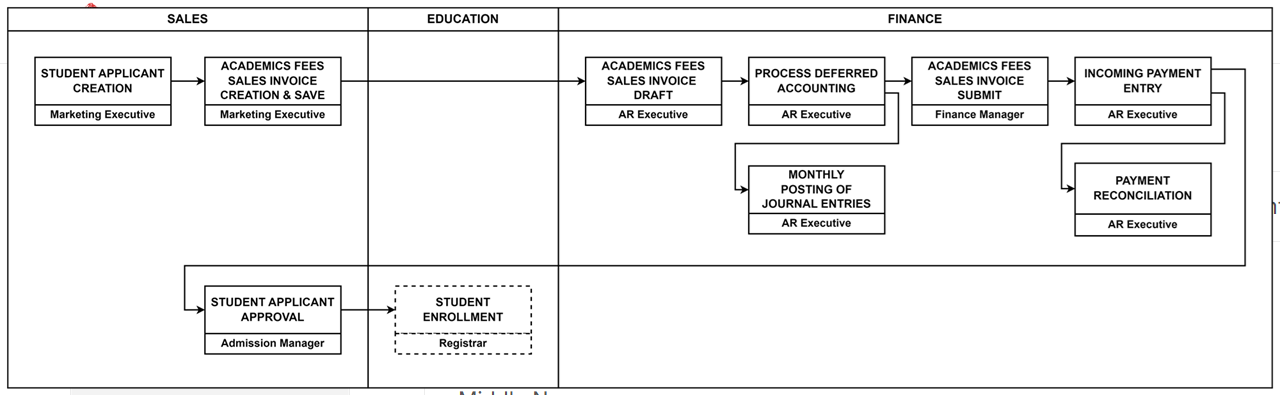
Various activities executed under this process are given below:
| Activity | Executed by | Navigation | Link |
|---|---|---|---|
| Student Applicant Creation | Marketing Executive | Navigation: Home > CRM> Lead> Create> Student Applicant | Click here |
| Academic Fees Sales Invoice Creation | Marketing Executive | Navigation: Home > Education> Student Applicant> Create Sales Invoice OR Navigation: Home > Selling > Sales Invoice | Click here |
| Process Deferred Accounting | AR Executive | Home > Accounting Module > Process Deferred Accounting | [Click here] |
| Monthly Posting of Journal Entry | AR Executive | Home > Accounting Module > Journal Entry | [Click here] |
| Academic Fees Sales Invoice Submission | Finance Manager | Navigation: Home > Education> Student Applicant> Create Sales Invoice OR Navigation: Home > Selling > Sales Invoice | Click here |
| Incoming Bank Entry | AR Executive | Home > Accounting Module > Select Payment Entry > Click on New Payment Entry OR Home > Go to Accounting Module > Select Receivables > Go to Payment Entry > Click on New Payment Entry | [Click here] |
| Payment Reconciliation | AP Executive / Finance Manager | Home > Go to Accounting Module > Select Payables > Go to Payment Reconciliation | [Click here] |
| Student Applicant Approval | Admission Manager | Home>Education>Student Applicant>click on Approve / Reject (button) | [Click here] |
| Student Enrollment for the Academic Year | Registrar | Home>Education>Student Applicant>click on Enroll button | [Click here] |
Other Sales
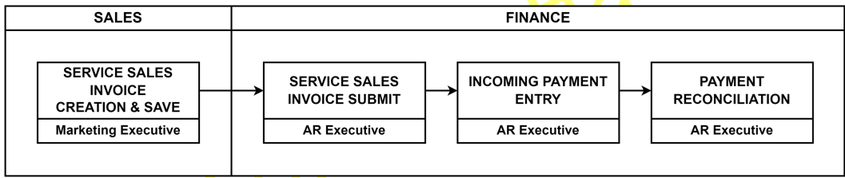
| Activity | Executed by | Navigation | Link |
|---|---|---|---|
| Service Sales Invoice Creation | Marketing Executive | Home> Accounting > Sales Invoice > Add Sales Invoice | Click here |
| Sales Invoice Submission | AR Executive Finance Manager | Home > Go to Selling Module > Go to Sales Invoice | Click here |
| Incoming Bank Entry | AR Executive | Home > Accounting Module > Select Payment Entry > Click on New Payment Entry | Click here |
| Payment Reconciliation | AP Executive / Finance Manager | Home > Go to Accounting Module > Select Payables > Go to Payment Reconciliation | [Click here] |